<?xml version="1.0" encoding="utf-8"?>
<feed xmlns="http://www.w3.org/2005/Atom">
    <title>MindEngine.net Blog</title>
    <link href="http://mindengine.net/rss.xml" rel="self"/>
    <link href="http://mindengine.net"/>
    <id>urn:uuid:60a76c80-d399-11d9-b91C-0003939e0af6</id>
    <updated>2003-12-13T18:30:02Z</updated>
        <entry>
            <title>Testing Front-end in isolation</title>
            <link href="http://mindengine.net/post/2016-10-08-testing-front-end-in-isolation"/>
            <link rel="alternate" type="text/html" href="http://mindengine.net/post/2016-10-08-testing-front-end-in-isolation"/>
            <id>urn:uuid:2016-10-08-testing-front-end-in-isolation</id>
            <updated>2016-10-11T06:00:00Z</updated>
            <summary>Testing Front-end in isolation</summary>
            <content type="html"><![CDATA[
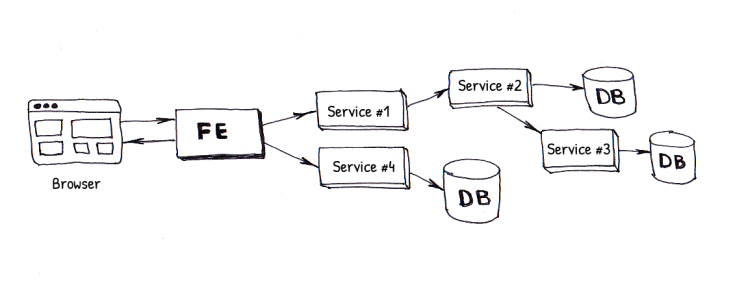
                <p>For quite a long time (since 2007) I am working on test automation. GUI testing was a huge part of that and it was always something I never really enjoyed. I did have a reason, so as many of my coleagues, due to a lot of facts. It is not only hard to get a green build in our CI pipeline but it is also nearly impossible to execute all of the tests locally before commiting the code. At the moment I am working at eBay/Marktplaats and we have a pretty large set of Selenium tests (around 2500). The website itself (<a href="http://marktplaats.nl">http://marktplaats.nl</a>) is built using Service Oriented Architecture and we are trying to move towards using <a href="http://www.martinfowler.com/articles/microservices.html">microservices</a> but that is still a long way. At the moment our website consists of 5 front-end applications and around 75 back-end services. At the same time there are a lot of different databases. In some cases services share the same database and in some case they have a dedicated one. Unfortunately, when it comes to a Selenium test, it is always implemented as an integration test, meaning that all services and databases are supposed to be up and running. Due to the fact of having around 40 enginers in 6 teams working on the same codebase it is hard to get a green build. People often push broken code and, since front-end depends on every service, a small bug somewhere deep in a specific service can break the whole flow.</p><p><img border="0" src="/post/2016-10-08-testing-front-end-in-isolation/files/fe-complexity.png"/></p><p>At some point I decided to rethink the UI testing strategy and started to look for something else. I had to find an answer to a lot of questions. What do we really want to test with Selenium? Can we reduce the scope of Selenium tests, make them run 2-3 seconds on average per test and drastically reduce the amount of flakiness in our CI? Do we really want a layout test to break due to a bug in back-end service? Can we make Selenium tests just part of the front-end repo without maintaining separate tests and stubs repos? And last but not least: can we make executing tests locally easier for everyone in the team? </p>
                ]]>
            </content>
            <author>
                <name>Ivan Shubin</name>
            </author>
        </entry>
        <entry>
            <title>Galen and SauceLabs. Testing how your websites look on mobile devices</title>
            <link href="http://mindengine.net/post/2014-10-05-galen-and-saucelabs.-testing-how-your-websites-look-on-mobile-devices"/>
            <link rel="alternate" type="text/html" href="http://mindengine.net/post/2014-10-05-galen-and-saucelabs.-testing-how-your-websites-look-on-mobile-devices"/>
            <id>urn:uuid:2014-10-05-galen-and-saucelabs.-testing-how-your-websites-look-on-mobile-devices</id>
            <updated>2014-10-05T07:16:00Z</updated>
            <summary>Galen and SauceLabs. Testing how your websites look on mobile devices</summary>
            <content type="html"><![CDATA[
                <p>Quite often I am asked the same question: <i>"how do I run Galen in "SauceLabs?"</i>. Finally I got some time to write a complete tutorial. <a href="https://saucelabs.com">SauceLabs</a> is a great service allowing you to easily test on various platforms and browsers including Android, iOS, Window 8.1 etc. I was surprised how easy it was for me to just reconfigure my Galen tests and point them to the SauceLabs Selenium Grid. Well, maybe not that easy, as there some little tricks and that is why I am writting this tutorial.</p>
                ]]>
            </content>
            <author>
                <name>Ivan Shubin</name>
            </author>
        </entry>
        <entry>
            <title>Writing Galen tests with Javascript</title>
            <link href="http://mindengine.net/post/2014-08-17-writing-galen-tests-with-javascript"/>
            <link rel="alternate" type="text/html" href="http://mindengine.net/post/2014-08-17-writing-galen-tests-with-javascript"/>
            <id>urn:uuid:2014-08-17-writing-galen-tests-with-javascript</id>
            <updated>2014-08-17T19:03:00Z</updated>
            <summary>Writing Galen tests with Javascript</summary>
            <content type="html"><![CDATA[
                <p>In version 1.0 a major change was introduced to execution and reporting system in Galen Framework. From now on it is possible to write and manage all your tests in Javascript. So what would be the difference compared to the original basic runner? What has changed is that you don&#8217;t need <code>*.test</code> files anymore. Instead you define your tests in javascript files with <code>*.test.js</code> suffix. Javascript gives you freedom to construct your own way of definining tests. Lets take a look at the simplest test:</p><code class="block" data-language="javascript">test(&quot;Home page test&quot;, function () {
    // this is the body of the test

    // Instantiating the WebDriver, loading the page and changing the size of the browser window
    var driver = createDriver(&quot;http://testapp.galenframework.com&quot;, &quot;1024x768&quot;);

    // Checking layout on the page
    checkLayout(driver, &quot;specs/homepage.spec&quot;, &quot;desktop&quot;);

    // Quiting the browser
    driver.quit();
});
</code>
                ]]>
            </content>
            <author>
                <name>Ivan Shubin</name>
            </author>
        </entry>
        <entry>
            <title>Testing internationalization on the website with Galen Framework</title>
            <link href="http://mindengine.net/post/2014-04-30-testing-internationalization-on-the-website-with-galen-framework"/>
            <link rel="alternate" type="text/html" href="http://mindengine.net/post/2014-04-30-testing-internationalization-on-the-website-with-galen-framework"/>
            <id>urn:uuid:2014-04-30-testing-internationalization-on-the-website-with-galen-framework</id>
            <updated>2014-04-30T19:46:00Z</updated>
            <summary>Testing internationalization on the website with Galen Framework</summary>
            <content type="html"><![CDATA[
                <p>There is one more thing that is possible to test with Galen Framework except layout. Since version 0.10.1 Galen Framework introduced a convenient way to test internatiolization. According to <a href="http://galenframework.com/docs/reference-galen-spec-language-guide/">Galen official documentation</a> you can test text for specific items on page. But what to do if there are multiple languages on the website and you want to test all of them? Here is a solution.</p>
                ]]>
            </content>
            <author>
                <name>Ivan Shubin</name>
            </author>
        </entry>
        <entry>
            <title>Testing colors on your website with Galen Framework</title>
            <link href="http://mindengine.net/post/2014-01-14-testing-colors-on-your-website-with-galen-framework"/>
            <link rel="alternate" type="text/html" href="http://mindengine.net/post/2014-01-14-testing-colors-on-your-website-with-galen-framework"/>
            <id>urn:uuid:2014-01-14-testing-colors-on-your-website-with-galen-framework</id>
            <updated>2014-01-14T19:10:00Z</updated>
            <summary>Testing colors on your website with Galen Framework</summary>
            <content type="html"><![CDATA[
                <p>In previous articles I have been writing about layout testing in <a href="http://galenframework.com">Galen Framework</a> but there is also one field left unexplored &#8211; color testing. As of version 0.7.2 Galen Framework has a so called <strong>"color scheme"</strong> spec which allows you to check the color distribution for a specific element on page. Why would you need this? For example lets say you have a special form and by requirements you have to make it grayed-out for unregistered users. How would you check that with automated tests? With Galen Framework now you can do it by taking a screenshot and then checking color distribution on the form. Of course it is still far away from ideal visual verification but at least it is better than just verifying the CSS classes on the elements. Also for the moment this works best only in Firefox as there are some issues with taking scheenshots in Chrome and IE.</p><p><img border="0" src="/public/clipart/color-balls.jpg"/></p><p>If you have version older than 0.7.2 please download the latest version of Galen Framework <a href="http://galenframework.com/download/">here</a><br/>Lets see how we could use this spec...</p>
                ]]>
            </content>
            <author>
                <name>Ivan Shubin</name>
            </author>
        </entry>
        <entry>
            <title>Configuring Galen Framework for Windows</title>
            <link href="http://mindengine.net/post/2014-01-08-configuring-galen-framework-for-windows"/>
            <link rel="alternate" type="text/html" href="http://mindengine.net/post/2014-01-08-configuring-galen-framework-for-windows"/>
            <id>urn:uuid:2014-01-08-configuring-galen-framework-for-windows</id>
            <updated>2014-01-08T20:22:00Z</updated>
            <summary>Configuring Galen Framework for Windows</summary>
            <content type="html"><![CDATA[
                <p>I have received a complain that Galen Framework is not very suitable for Windows so I had to introduce a simple batch file <code>galen.bat</code>. Also with this article I decided to make a complete guide for configuring Galen Framework for Windows 7 and for Windows XP. So if you are using Windows operating system and you have troubles with configuring Galen Framework please read this article</p>
                ]]>
            </content>
            <author>
                <name>Ivan Shubin</name>
            </author>
        </entry>
        <entry>
            <title>Layout testing for responsive websites with Selenium. Doing it properly</title>
            <link href="http://mindengine.net/post/2014-01-07-layout-testing-for-responsive-websites-with-selenium.-doing-it-properly"/>
            <link rel="alternate" type="text/html" href="http://mindengine.net/post/2014-01-07-layout-testing-for-responsive-websites-with-selenium.-doing-it-properly"/>
            <id>urn:uuid:2014-01-07-layout-testing-for-responsive-websites-with-selenium.-doing-it-properly</id>
            <updated>2014-01-07T19:13:00Z</updated>
            <summary>Layout testing for responsive websites with Selenium. Doing it properly</summary>
            <content type="html"><![CDATA[
                <p>Automated layout testing for website was always a question if it is at all possible. When Selenium rose in its popularity a lot of people tried to approach it for layout testing but more and more were stating that Selenium is not the right tool for it. Well, I still think it is the best tool ever for layout testing. And thats what I tried to prove with <a href="http://galenframework.com">Galen Framework</a>. In my mind the best way to test layout is by checking each individual element on page relatively to another elements. Selenium WebDriver offers functionality for getting location and dimension of element and it is doing this quite good in all browsers. <a href="http://galenframework.com">Galen Framework</a> allows you to express you expectations towards website layout and then uses Selenium to retrieve information about page elements. Lets see how to get the best coverage for layout testing.</p>
                ]]>
            </content>
            <author>
                <name>Ivan Shubin</name>
            </author>
        </entry>
        <entry>
            <title>GalenJs. Unleash the power of javascript in Galen Framework</title>
            <link href="http://mindengine.net/post/2013-12-26-galenjs.-unleash-the-power-of-javascript-in-galen-framework"/>
            <link rel="alternate" type="text/html" href="http://mindengine.net/post/2013-12-26-galenjs.-unleash-the-power-of-javascript-in-galen-framework"/>
            <id>urn:uuid:2013-12-26-galenjs.-unleash-the-power-of-javascript-in-galen-framework</id>
            <updated>2013-12-26T14:54:00Z</updated>
            <summary>GalenJs. Unleash the power of javascript in Galen Framework</summary>
            <content type="html"><![CDATA[
                <p>In my previous posts I wrote about layout testing in Galen Framework. But what if we need to perform some actions on the browser to get to some specific page? For instance lets say we have to test a blog website. And to do it properly we should come up with a realiable automation so we need to post an article on the website so we can later open it and check the layout. To perform all these complex actions Galen Framework provides an action called <code>run</code>. It is used in order to invoke a javascript where you can take over the WebDriver and perform some actions on the page like clicking, typing text and basically anything that WebDriver allows.</p><p>For the demo purpose lets use <a href="http://samples.galenframework.com/tutorial-selenium-interaction/tutorial.html">this page</a><br/>What we need to do is to log in using the form on the page. Lets start writting a basic test. First of all we need to download the latest <code>galenjs.js</code> file. You can get it from <a href="https://github.com/galenframework/galenjs">GitHub repository</a>. Just put this file in your test project folder. Now lets create a <code>login.js</code> file.</p><code class="block" data-language="javascript">// Include the GalenJs library
load(&quot;galenjs.js&quot;);

// Create a GalenJs instance from driver
var $ = GalenJs.create(driver);

// Create a login page object
var loginPage = $.page({
    email:      &quot;#login&quot;,
    password:   &quot;#password&quot;,
    submit:     &quot;.login-form a.button&quot;
});

// Perform login flow
loginPage.email.typeText(&quot;testuser&quot;);
loginPage.password.typeText(&quot;P@ssw0rd&quot;);
loginPage.submit.click();
</code><p>That&#8217;s it. Now we can execute this script in our test suite. Lets create a file <code>my.test</code></p><code class="block" data-language="galen-suites">User profile test
    http://samples.galenframework.com/tutorial-selenium-interaction/tutorial.html 1024x768
        run login.js
</code><p>Now you can run it with this command:</p><code class="block" data-language="bash">galen test my.test --htmlreport reports
</code><p>So this is the basic stuff that you can do with GalenJs. As you see it is quite usefull since it allows to write a better code in javascript with minimal effort. And what is more important it allows you to get to any resource on your website so you can also test its layout with Galen Framework.</p>
                ]]>
            </content>
            <author>
                <name>Ivan Shubin</name>
            </author>
        </entry>
        <entry>
            <title>Cross-browser layout testing with Galen Framework</title>
            <link href="http://mindengine.net/post/2013-12-20-cross-browser-layout-testing-with-galen-framework"/>
            <link rel="alternate" type="text/html" href="http://mindengine.net/post/2013-12-20-cross-browser-layout-testing-with-galen-framework"/>
            <id>urn:uuid:2013-12-20-cross-browser-layout-testing-with-galen-framework</id>
            <updated>2013-12-20T16:34:00Z</updated>
            <summary>Cross-browser layout testing with Galen Framework</summary>
            <content type="html"><![CDATA[
                <p>In the previous post <a href="http://mindengine.net/post/2013-11-16-tdd-for-responsive-design-or-how-to-automate-testing-of-website-layout-for-different-devices/">TDD for Responsive Design</a> I have introduced you the <a href="http://galenframework.com">Galen Framework</a> - the tool which is very useful when it comes to automating layout testing for responsive website. In this post I would like to show you how to use Galen Framework for testing cross-browser compatibility. We all know when it comes to a website development it is a hell to support it in different browsers. With every little change on the website there is always a chance of breaking the layout in some other browser. And the sooner you find it &#8211; the better. Lets see how to automate that using Galen Framework together with <a href="http://code.google.com/p/selenium/wiki/Grid2">Selenium Grid</a>.</p>
                ]]>
            </content>
            <author>
                <name>Ivan Shubin</name>
            </author>
        </entry>
        <entry>
            <title>Galen Framework Introduction - Basic layout testing for responsive web page</title>
            <link href="http://mindengine.net/post/2013-12-18-galen-framework-introduction---basic-layout-testing-for-responsive-web-page"/>
            <link rel="alternate" type="text/html" href="http://mindengine.net/post/2013-12-18-galen-framework-introduction---basic-layout-testing-for-responsive-web-page"/>
            <id>urn:uuid:2013-12-18-galen-framework-introduction---basic-layout-testing-for-responsive-web-page</id>
            <updated>2013-12-18T19:24:00Z</updated>
            <summary>Galen Framework Introduction - Basic layout testing for responsive web page</summary>
            <content type="html"><![CDATA[


<div align="center">

    <div class="video-wrapper">
        <div class="video-container">
                    <iframe width="600" height="400" src="//www.youtube.com/embed/hn4YvigVMGw" frameborder="0" allowfullscreen></iframe>
        </div>
    </div>
</div>

                ]]>
            </content>
            <author>
                <name>Ivan Shubin</name>
            </author>
        </entry>
        <entry>
            <title>TDD for Responsive Design. Or how to automate testing of website layout for different devices</title>
            <link href="http://mindengine.net/post/2013-11-16-tdd-for-responsive-design-or-how-to-automate-testing-of-website-layout-for-different-devices"/>
            <link rel="alternate" type="text/html" href="http://mindengine.net/post/2013-11-16-tdd-for-responsive-design-or-how-to-automate-testing-of-website-layout-for-different-devices"/>
            <id>urn:uuid:2013-11-16-tdd-for-responsive-design-or-how-to-automate-testing-of-website-layout-for-different-devices</id>
            <updated>2013-11-16T08:39:00Z</updated>
            <summary>TDD for Responsive Design. Or how to automate testing of website layout for different devices</summary>
            <content type="html"><![CDATA[
                <p>Actually its quite hard to tell what Galen Framework is. It all began with the need for testing website on different browsers. I had to check whether my website is acting weird in IE, Chrome, Firefox, Opera etc. Then the Responsive Design trend came in and now suddenly I get more work. I have to stretch my browser to check if the layout is broken or not for mobile and tablet versions. And even having WebDriver and Selenium Grid at that time did not really help to solve my problem with testing. One of the ideas I tried to implement was like this: tests were making screenshots of the same page in different browsers and then later these screenshots were added to one big report. Later one of the QA engineers had to quickly go through the report and look for something suspicious. This idea didn&#8217;t live for a long time. At some point we had to throw it away. Especially it became useless when Responsive Design kicked in. I needed a special tool that would allow me to express how I see my website on different devices so later I could use it as a document as well as executable test. Thats how I came up with Galen Framework. The idea was quite simple &#8211; just take a location and dimensions of element and verify it relatively to other elements on page.</p><p>In short &#8211; Galen Framework is a special language and a tool for testing website layout in a real browser. Or even more short &#8211; Galen Framework allows to test Responsive Design and Cross-Browser Html Layout.</p>
                ]]>
            </content>
            <author>
                <name>Ivan Shubin</name>
            </author>
        </entry>
</feed>